Preview each pull request before you merge it
Each pull request can now get its own running copy of your project, and Tenkai comments its URL on GitHub.
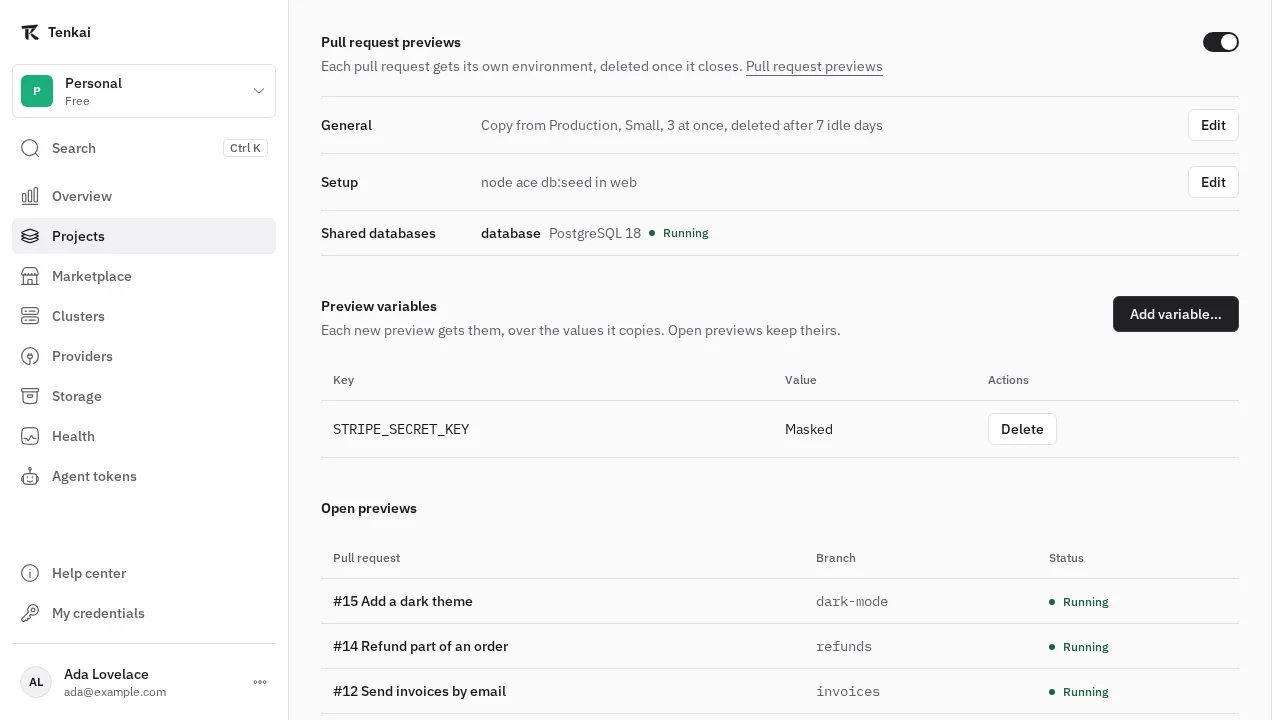
A diff tells you what changed, and clicking through the change tells you whether it works. Turn on pull request previews, and Tenkai opens a copy of your project for each pull request, then deletes it when the pull request closes.
Turn them on
Previews are still experimental, so an owner or admin first turns on Pull request previews under Experimental in the team settings and connects GitHub. Open a project, then its Previews tab, choose the environment to copy, such as staging, and turn the switch on.
Hako and your agents can set them up too, and you approve each change.
See Turn previews on for the details.
A copy of your project for each pull request
Each pull request gets an environment named pr-<number>, which deploys its last commit at every push. Tenkai comments on the pull request with the URL of each web application and keeps that comment up to date, so your reviewers open the preview straight from GitHub.
Your previews share their database servers, with an empty database for each preview, so ten previews do not start ten servers. Setup commands seed each new preview once, and Preview variables give previews the values they need, such as a Stripe test key.
An application deployed from a container image waits for the image your CI builds for the pull request, which the Tenkai deploy action sends to its preview.
Keep them small
Previews run on your project's cluster beside production. You choose how many run at once and the size of each resource, and Tenkai deletes a preview whose pull request had no push for a few days.
See Pull request previews for everything previews do.