Keep a PostgreSQL writable when a node fails
Turn on high availability for a PostgreSQL: what it protects against, what it costs, what a cluster needs, and why it does not replace backups.
What high availability protects against
High availability for PostgreSQL is in early access, offered to the teams that try it first.
With High availability, the PostgreSQL runs two instances on two nodes of its cluster: a primary, which takes the writes, and a standby, which receives each of them. When the primary fails, the standby becomes the primary, and your applications write again through the same hostname, without a deployment:
- about 3 seconds after a crash of PostgreSQL on the primary;
- about 20 to 25 seconds after the loss of the node of the primary, when that node no longer reaches the others, or when Patroni hangs on the primary while its PostgreSQL still runs. In our tests on a cluster of three managers, the writes came back after 21 to 24 seconds when the node lost its power, 23 to 24 seconds when it was cut from the others, and 21 to 23 seconds when Patroni hung.
While the standby follows, a failover loses no confirmed write. When the standby is lost, the writes pause for about 20 seconds: the primary waits for the standby to confirm each write, until Patroni stops waiting for it. The primary then takes writes alone, and those writes are on the primary only until the standby is back.
The sessions open on the former primary close at a failover, so your application must connect again. The failover runs on the nodes of the cluster, so it works while Tenkai itself is unreachable.
A standby that comes back catches up from up to 1 GB of write-ahead log that the primary kept for it. A standby that was away while the database wrote more than that can no longer catch up, so Tenkai asks Patroni to rebuild it from the primary. Until the copy ends, the service runs with one instance.
What it does not protect against
- A mistake in the data. A deleted row or a broken migration reaches the standby too. Only a backup brings that data back.
- The loss of both nodes, or of their disks.
- The loss of a majority of the manager nodes, together with an instance. The instances elect the primary in the etcd of the cluster, which needs more than half of the manager nodes. Without that majority, the primary keeps taking writes for as long as it reaches the standby. When it loses the standby too, it steps down within seconds and no instance takes its place, so no second primary can appear. From then on, the hostname closes each connection, and your applications can neither write nor read until etcd has its majority again. An instance then takes the writes by itself within seconds, without losing a confirmed write. With three manager nodes, etcd survives the loss of one; to survive the loss of two, run five.
What it costs
Each instance reserves the size you choose, so the PostgreSQL reserves twice as much on the cluster. A Small PostgreSQL with high availability reserves 256 MB on each of two nodes.
Each instance keeps 64 MB of its memory for Patroni, which runs PostgreSQL and elects the primary. So the option needs at least Small, or a custom size of 256 MB.
The cluster also runs etcd, with one member of 64 MB on each manager node. The first PostgreSQL with high availability of a cluster starts it, and the deletion of the last one removes it.
What a cluster needs
- Three manager nodes. Make a cluster highly available explains how to promote two nodes.
- Two nodes with room for the size. The two instances never share a node.
Create a PostgreSQL with high availability
- Open a project created on a cluster with three manager nodes.
- Choose Add resource and select PostgreSQL.
- Select High availability, then a Size.
- Choose the Add button at the foot of the dialog.
The first PostgreSQL with high availability of a cluster waits a few minutes for its etcd to start. If etcd does not start, the provisioning fails: an owner or admin retries etcd from the cluster page, then you retry the database.
To turn it on for a PostgreSQL that already runs, read the next section. You cannot turn it off for one that has it.
Turn it on for a PostgreSQL that already runs
An owner, an admin or a developer chooses Turn on high availability… in the More actions menu of the PostgreSQL. The database keeps its data, its roles, its bindings and its backups. Its hostname, port and credentials do not change, so you do not redeploy your applications.
- Take a backup.
- Close its external access if one is open, and wait until it shows as closed. You can open it again afterwards.
- Turn off its continuous backup if it has one, then turn it on again once high availability runs.
- Read the dialog, then choose Turn on high availability.
Tenkai refuses for the reasons of a creation, and while an external access or a continuous backup is on, a backup runs, or the PostgreSQL restarts, restores a backup or is being deleted.
Tenkai first prepares both nodes, and does not touch the database before they are ready. A failure until then leaves the PostgreSQL running as the one instance it was. If a node cannot be prepared, the page shows the service as Failed: bring the node back, then choose Retry provisioning.
Then the database stops once. Its instance restarts on its volume under Patroni, which adopts the data without a copy. The open sessions close, and your applications connect again to the same hostname. Expect about fifteen seconds. In our tests on a cluster, with a database of 300,000 rows and constant writes, the writes stopped for between 12 and 13 seconds. The stop depends on your servers and may be longer.
The standby then gets its data from the primary while the primary takes the writes. A large database lengthens that copy, not the stop.
Tenkai names the unlogged tables once the service runs. PostgreSQL does not copy their rows to the standby, so a failover leaves them empty. Use ALTER TABLE <table> SET LOGGED if their rows matter.
If the change fails after the database stopped, the page shows the service as Failed. Choose Retry provisioning: Tenkai goes on from where it stopped, with the data on its volume. The PostgreSQL does not return to one instance, and the database may stay stopped until you retry.
Connect your applications
Bind the PostgreSQL to an application as any managed service. The connection details are the same as without high availability.
The hostname leads to the writer endpoint, which sends each connection to the current primary. Use a connection pool that opens a new connection when one fails, as most do.
Connect from outside the cluster
Owners and admins open External access as for any PostgreSQL: see Connect from outside the cluster. Your client always reaches the primary, at the same address after a failover.
An instance that was stopped when external access opened keeps an older certificate. If it becomes the primary, a client that verifies is refused until you open external access again.
Back up and restore
Backups work as for a PostgreSQL with one instance, and restore into a PostgreSQL with one instance or two. A database with high availability says what changes during a restore.
Read the instances
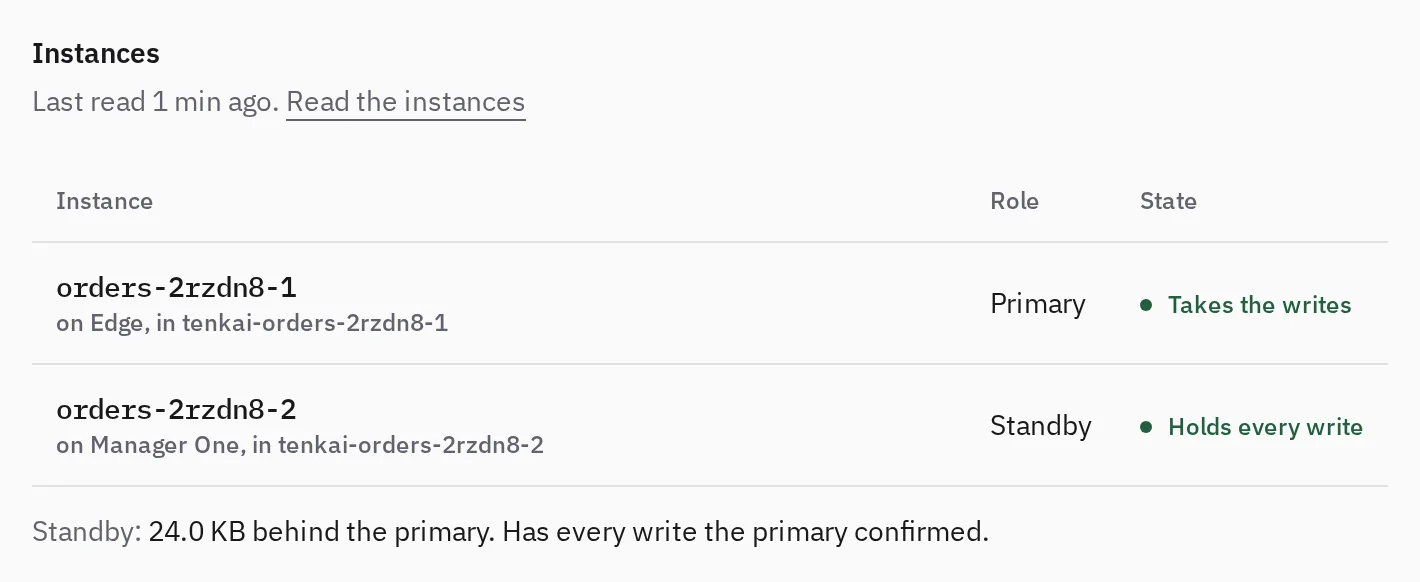
The Instances section of the page of a PostgreSQL with high availability lists its two instances: the name of each one and its volume, its node, its role and its state. Tenkai reads them every minute while the service runs, from what Patroni says on each instance and from the answer that the writer endpoint asks each instance. The open overview refreshes every minute while the browser tab is visible, including after a failover. It shows the roles as Patroni gives them: Tenkai prefers no instance. To choose the node of the primary, move it.
The Role column:
- Primary: the instance that Patroni elected. It takes the writes of your applications.
- Standby: the other instance, while it receives the write-ahead log of the primary.
- An instance that replicates nothing has no role. When Tenkai could not read its local status, the primary can still identify it as a standby.
The State column:
- Takes the writes: the primary.
- Holds every write: a standby that the primary waits for before it confirms a write. If the primary fails, Patroni promotes it, and no confirmed write is lost.
- Reports synchronous: the local status says the instance is synchronous, but Tenkai could not identify a primary. This does not certify the protection of the database.
- Receiving writes: a standby that receives the write-ahead log, but whose synchronous protection Tenkai could not confirm. It may not be able to take over if the primary fails.
- Copying the data: Patroni copies the whole data of the primary to rebuild the instance.
- Not replicating: PostgreSQL runs, and receives nothing from a primary.
- Rebuilding from the primary and Rebuild failed: Tenkai asked Patroni to copy the primary again, see Rebuild a standby.
- Starting, Stopping and Failed: what Patroni says of PostgreSQL on the instance. A primary that lost the leader lock shows as Stopping for a moment, and not as the instance that takes the writes.
- Not running: nothing runs it on its node.
- Not read: Tenkai could not reach its node, or its local status was missing or unreadable. Tenkai does not take it as stopped or starting. An answered writer check still identifies the primary.
Under the table, Standby says how far the standby is behind the primary, in write-ahead log, and whether it holds every write the primary confirmed. 0 B behind means that the standby has received at least as far as the primary's written position, from two separate readings. When Tenkai could not read both positions, it says that the distance is unknown, even when the primary confirms synchronous protection. That distance is not the measure of what a failover loses: a standby that the primary waits for holds every confirmed write, however far behind it is for the writes the primary has not confirmed yet.
The two instances answer separately. Tenkai does not show Holds every write when their readings disagree, or when the readable primary does not report the standby as synchronous. The summary then says that Tenkai could not confirm the protection, not that the primary confirms writes alone. A failed HTTP check stays Not read: it does not prove that no instance takes the writes. When the standby's local status is missing, Tenkai uses what the primary reports of its replication, without inventing a lag or an alert from the failed read alone.
When a protection is missing, the section says so above the table, with the buttons of what to do, and health lists the database under High availability:
- An instance cannot take over if the primary fails. It does not replicate, so it misses the writes made since it stopped, and a failure of the primary now stops the writes. Tenkai reports it even when it could not read the other instance, so it does not say that a primary runs or which instance holds these writes. The instance catches up by itself once its node runs. If it stays like this, choose Open the cluster and check its node. When its machine is gone for good, choose Replace an instance…: see Replace an instance on another node.
- An instance has unconfirmed protection. It receives data or writes, but Tenkai could not confirm that it holds every write the primary confirmed. It may not be able to take over if the primary fails.
- Your applications cannot write. No instance takes the writes, and the hostname closes each connection, so your applications cannot read either. Patroni elects a primary by itself once the instance that holds every write runs and the etcd of the cluster answers: choose Open the cluster and check the nodes of both instances and the cluster etcd. If the node of that instance is gone for good, Patroni never promotes the other one, and a restore fails when that node holds the first instance, where it writes the data. Choose Open the backups, then create a new database from a backup, or from a moment of the continuous backup, and bind your applications to it. The button shows once a backup succeeded or the continuous backup has a period to return to.
Moving the primary does not help in either case: it needs a standby that holds every write.
A reading older than 5 minutes shows as old: Tenkai could not read the instances since, and health no longer lists the database from it.
Rebuild a standby
A standby that fell further behind than the 1 GB of write-ahead log the primary keeps cannot follow it any more. Tenkai notices it on two readings in a row, and asks Patroni to remove the data of that standby and copy the primary again. You do nothing. A standby that merely restarts, or that Tenkai could not read, is left alone, and so is the one the primary waits for, which holds every confirmed write.
- The database keeps serving from the primary. It runs without a standby until the copy ends, so a failure of the primary meanwhile stops it. The primary's disk is not at risk: it keeps at most 1 GB of log for the standby.
- The instance shows Rebuilding from the primary, then Holds every write once it follows. A large database takes a while: the copy reads all of it from the primary.
- If the standby does not follow within 30 minutes, it shows Rebuild failed. Tenkai asks again at most every 10 minutes while the standby stays behind. Check the nodes of both instances on the page of the cluster.
- A former primary that cannot follow the new one, because it holds writes the new primary does not have, is rebuilt the same way, so it never becomes a second writer. Patroni does it, and only while another instance holds the primary.
Tenkai never rebuilds the primary. It asks for the standby only when it reads an instance that holds the primary, and Patroni refuses the request when the cluster has no leader at that moment. If the primary is lost after Patroni accepted, the standby may stay empty until a primary is back: Tenkai then asks again.
Move the primary
Move the primary before you work on the node that holds it, or to choose which node takes the writes. Patroni does the move: Tenkai asks for it and never promotes an instance itself.
- Open the More actions menu of the PostgreSQL and choose Move the primary….
- Read what the dialog says, then choose Move the primary.
- Follow the line under the drawing of its Lifecycle section until it names the new primary.
An owner, an admin or a developer can move it while the PostgreSQL runs. Tenkai first reads both instances. The standby must run and be the one the primary waits for before it confirms a write, so it holds every write the primary confirmed. When it is not, nothing changes, and the line under the drawing says which instance and why. Wait until it has caught up, then move the primary again.
Patroni stops the primary after it sent the standby all of its write-ahead log, then promotes the standby. Tenkai checks that the standby is the only instance that takes the writes, and that a session through the writer endpoint ends on it. The sessions open on the former primary close, so your application connects again to the same hostname. The writes stop for a few seconds. No data moves, and the former primary rejoins as the standby.
A move never runs beside another operation of the same PostgreSQL, such as a restore or its deletion, and never to a node that a server reboot is about to stop. When Patroni refuses or gives the primary back, the service keeps running and the line says so. When no instance holds the primary alone in time, or the writer endpoint does not follow, the page shows the service as Failed: choose Retry provisioning. The retry does not move the primary again: move it again once the service runs.
A server reboot moves the primary for you when the node holds it. The instance on the node rejoins as the standby once the node is back, and the primary stays where it moved. When the standby is down or behind, or another operation runs on the PostgreSQL, Tenkai does not reboot the node, and the page of the PostgreSQL says why.
Replace an instance on another node
Replace an instance when its machine is gone for good, or before you drain or remove the node that holds it. An owner, an admin or a developer chooses Replace an instance… in the More actions menu of the PostgreSQL, then the instance and the node that receives the new one.
The new node must accept workloads, have room for the size of the service, and hold neither instance. Tenkai refuses another node and says why. On a cluster of three nodes, only the third is left.
The new instance copies the data of the primary while the database keeps taking writes. The old instance runs until the new one has received everything the primary wrote. The primary then confirms each write once both the old instance and the new one hold it, and Tenkai stops the old instance. It removes the old instance and its volume once the primary and the new instance confirm each write. A database of several GB takes minutes to copy. Writes may pause for a few seconds when the old standby stops.
When you replace the primary, Tenkai first asks Patroni to move it to the other instance, as move the primary does: the open sessions close once, and the other instance stays the primary. Tenkai refuses while that instance is not the standby that holds every write. When the machine of the primary is gone, Patroni promotes the other instance by itself within about 25 seconds: replace the former primary once the page shows a primary again. While no instance takes the writes, replacing waits: see Read the instances for the way out.
If the node of the instance that stays fails during the replacement, Patroni promotes the old instance or the new one, and the writes go to it without you doing anything. Tenkai removes nothing then: the service shows as Failed with the reason, and Retry provisioning continues once that node is back. A replacement that fails before the old instance stopped leaves it running as before, as the standby or the primary.
Tenkai stops the old instance only once it made sure that the old instance cannot take the primary. While the old node does not answer, its cluster reports it down, or the old instance does not run, Tenkai stops nothing and the service shows as Failed with the reason: bring the node back and choose Retry provisioning, or, for a machine that no longer runs, choose Its server is gone…. When you replace the instance of a machine that is gone, the copy starts only once you confirmed it.
In a rare case, the primary fails in the second during which Tenkai stops the old instance, just as that instance restarts. The database then takes no writes until the primary is back, or until you choose Retry provisioning, which starts the old instance again. No confirmed write is lost.
The old volume goes last. When the old node does not answer, the service shows as Failed and the node keeps counting as holding the data: bring it back and choose Retry provisioning, or, for a machine that no longer runs, choose Its server is gone… to end the replacement without that volume. If that machine ever comes back, delete its old volume, or the machine.
If the replacement fails, choose Retry provisioning to continue it. You cannot cancel a replacement or choose another node once it began. A restore, a change of size and another move of the primary wait until it ends.
Once the replacement ends, the old node can drain or leave its cluster. If a machine that held an etcd member of the cluster is gone, the cluster etcd needs its own repair.
What is not available yet
A PostgreSQL with high availability has a restore to a moment of its continuous backup, but no Change size.
Deleting it removes both instances and their volumes.