How much memory a server needs
See the memory Tenkai keeps on each node for the system, builds and its own services, why it keeps it, and what is left for your applications.
The first server of a cluster needs 2 GB of memory. A worker node you add later needs 1 GB. Tenkai keeps part of each node's memory for the system and its own services, so a deployment never takes what they need.
What a node keeps for itself
Tenkai keeps three shares. The first two make the system reserve of the node:
- System, on every node: 256 MB plus 5% of the memory, at most 1 GB. It covers the system, Docker, the cluster network and the Tenkai Agent.
- Builds, on the primary edge node, only once you turn Git builds on: a quarter of the memory, from 512 MB to 2 GB.
- Tenkai services, on the primary edge node: 224 MB for the edge router and the cluster registry.
The primary edge node runs the builds and the cluster registry. Today it is the edge node of the cluster. Other nodes keep only the share of the system: 307 MB on a server with 1 GB, 460 MB with 4 GB.
The rest is for your web applications and managed services. On the first server of a cluster:
1 GB server
531 MB kept. System and Docker: 307 MB, Tenkai: 224 MB, Your apps: 493 MB.
2 GB server
582 MB kept. System and Docker: 358 MB, Tenkai: 224 MB, Your apps: 1.4 GB.
4 GB server
684 MB kept. System and Docker: 460 MB, Tenkai: 224 MB, Your apps: 3.3 GB.
8 GB server
889 MB kept. System and Docker: 665 MB, Tenkai: 224 MB, Your apps: 7.1 GB.
16 GB server
1.2 GB kept. System and Docker: 1 GB, Tenkai: 224 MB, Your apps: 14.8 GB.
64 GB server
1.2 GB kept. System and Docker: 1 GB, Tenkai: 224 MB, Your apps: 62.8 GB.
- System and Docker
- 256 MB and 5% of the memory, at most 1 GB
- Tenkai
- 224 MB for the edge router and the registry
- Builds
- A quarter of the memory, from 512 MB to 2 GB, for the apps you deploy from Git
- Your apps
- Everything else
Tenkai also keeps CPU on the primary edge node: a quarter of its CPUs for builds, from 0.5 to 2, and 0.2 CPU for its services.
A cluster that runs etcd, for a PostgreSQL with high availability, reserves 64 MB on each manager node. A cluster with a scheduled job runs a scheduler that reserves 32 MB and 0.05 CPU on one manager node.
The dashboard, database and deployment jobs of Tenkai run on Tenkai, not on your servers. See How Tenkai runs your applications.
Turn Git builds on or off
Builds from a Git repository run on the primary edge node, next to your live applications, within their own share. A build that needs more fails, and your applications keep their memory. Container images need no build. A new cluster starts without the share for builds and deploys container images only.
To turn Git builds on, an owner or an admin:
- Opens the cluster and chooses Settings… in the Cluster actions menu.
- Selects Build applications from a Git repository, then chooses Save settings.
If the primary edge node lacks the free memory, Tenkai says how much is missing. Otherwise the edge node shows Setting up Git builds; applications can build from Git once that status goes away.
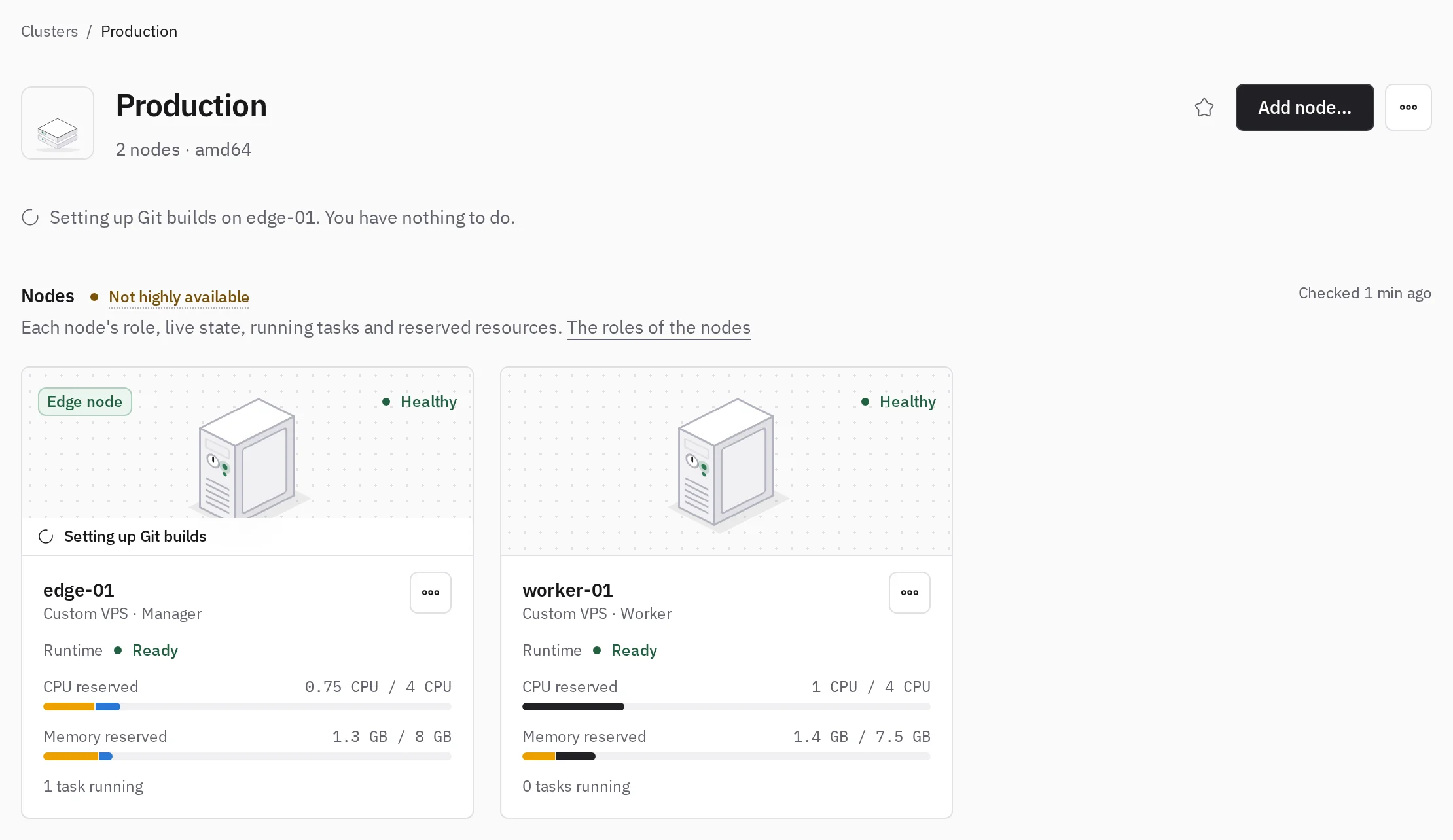
To turn them off, clear the box and save. It takes a minute or two, and the cluster page shows Turning off Git builds until it ends. Tenkai refuses while an application of the cluster builds from Git, and names it: delete it first, or create it again from a container image.
If a change fails, the cluster page says why; choose Retry there or on the edge node page. Until it succeeds, the cluster offers no Git source. A change is refused while the edge node moves: retry once the move ends.
To start every new cluster with Git builds, select the same box under New clusters in the team settings.
A small application's build can fill the 512 MB minimum. For a build that needs more than your primary edge node's share, build the image in GitHub Actions and deploy it from GHCR.
See the shares of your nodes
On the cluster page, point at the CPU or memory bar of a node to see what the system reserve, Tenkai and your resources hold.
Give your applications more room
- Add a worker node. It keeps only the share of the system. See Manage the nodes of a cluster.
- Keep applications off the primary edge node. Once another node accepts workloads, Stop accepting workloads on its card keeps its memory for traffic and builds.
- Change the size of a resource. A resource reserves its size on its node, whether it uses it or not. For an application, choose Edit next to Capacity in the Configuration tab, then select its size, and use Apply configuration or Deploy to apply it. Workers and managed services use Change size in More actions.